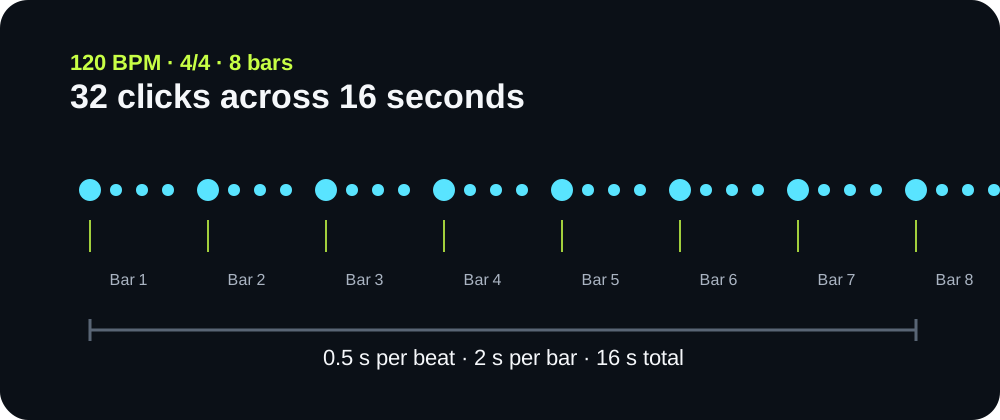
An auditable 120 BPM example
The default file uses 120 BPM, 4/4, eight bars, and one click per beat. One beat is 60 ÷ 120 = 0.5 seconds. One bar is 4 × 0.5 = 2 seconds. Eight bars are 8 × 2 = 16 seconds, containing 32 scheduled quarter-note clicks.
Free WAV click track maker
Choose a tempo, meter, length, and subdivision, then generate a downloadable mono WAV click track. The file is built in this browser; no audio is uploaded.
Ready to generate an 8-bar, 120 BPM click track.
The default file uses 120 BPM, 4/4, eight bars, and one click per beat. One beat is 60 ÷ 120 = 0.5 seconds. One bar is 4 × 0.5 = 2 seconds. Eight bars are 8 × 2 = 16 seconds, containing 32 scheduled quarter-note clicks.
Generate the click at the same BPM and meter as the session. In Pro Tools, choose File > Import > Audio, select the WAV, and place it on a new track from the project or song start. Keep the session tempo unchanged so the fixed audio intervals remain the reference you created.
Avid documents both the Import Audio command and its built-in Click track: Importing audio files and Creating a Click track.
| Setting | What changes | What stays fixed |
|---|---|---|
| BPM | Milliseconds between quarter-note beats | Selected meter and bar count |
| Beats per bar | Where the accented downbeat repeats | Quarter-note interval |
| Clicks per beat | Guide density inside each beat | Underlying BPM |
| Bars | Rendered file duration and total click count | Beat and subdivision spacing |
The WAV is mono, 16-bit PCM, and uses the selected 44.1 kHz or 48 kHz sample rate. The generator writes short synthesized click bursts and does not include music, speech, or a count-in.
No. Two clicks per beat halve the click spacing, but the quarter-note beat remains at the selected BPM.
Yes. Choose the song tempo, meter, and enough bars for the rehearsal section. The result is a plain timing guide; it does not include spoken cues, arrangement labels, or backing music.
With Downbeat accent on, the first beat of every bar uses a higher, stronger click so the meter remains audible.
No. The file has fixed intervals. It does not listen, adapt to tempo drift, or replace a tempo map.
The displayed duration and click count come directly from the selected values. The generated PCM samples are deterministic, but playback latency after import depends on the audio driver, project buffer, and monitoring path. This page does not measure that external latency.
Browser audio reference: MDN Web Audio API.
WAV generation and preview audio run locally in this browser. No click file or setting is uploaded.