Three practice views share one clock
Use this as a rhythm trainer online by following the visible beat and subdivisions, as a drum metronome online by choosing the hi-hat sound and downbeat accent, or as a polyrhythm metronome online by adding an independent pulse layer. The second pulse is scheduled on the same Web Audio clock, so the crossing pattern stays tied to the selected tempo instead of running from a separate page timer.
How to use this metronome online
Set a tempo directly or tap the pulse you want, then adjust the musical grid before starting the click.
- Choose the tempo with the number field or use the large Tap button while you hear the music.
- Select the time signature, subdivision, downbeat accent, and click sound that fit your practice phrase.
- Start the metronome and follow the moving beat markers as you play, sing, count, or rehearse.
What the tap timing feedback shows
The current reading comes from the newest gap between taps. The average uses the complete active tap sequence, and the interval row exposes the millisecond spacing behind both readings. This makes an uneven tap visible before it silently changes the practice tempo.
How the browser schedules each click
The page places click sounds on the Web Audio clock before they are due. A short look-ahead loop prepares upcoming notes, while each sound is started against AudioContext.currentTime rather than relying on a timer to fire at the exact beat.
Technical reference: AudioScheduledSourceNode.start() and AudioContext.currentTime.
Metronome online questions
These answers cover starting audio, changing the rhythmic grid, and setting a tempo by ear.
Why does the first click require a button press?
Browsers commonly wait for a user interaction before starting audio. Press Start metronome once to create and resume the local audio context.
What changes when I select a subdivision?
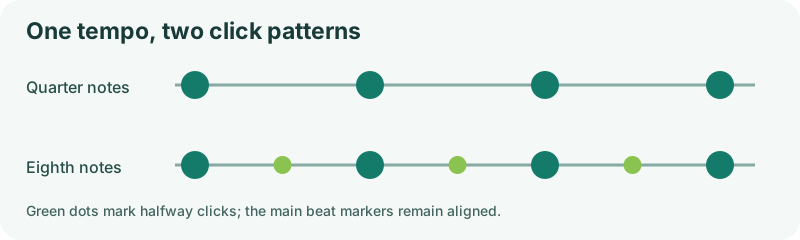
The main beat stays at the selected BPM, while quieter clicks divide the space inside that beat. The downbeat remains visually distinct from the other beats in the measure.
How does tap tempo control the metronome?
Each tap adds an interval to the existing tap reader. Once an average is available, that value is copied into the metronome tempo control without changing the original tap calculation.
Does this online metronome require an account or download?
No. The controls, tap readings, visual pulse, and generated sounds run in the current browser tab.
The metronome and tap analysis run locally in your browser. No tapping data is uploaded.