Count a drum pulse without microphone access
This drum BPM counter accepts taps from a stick hit, kick, snare, or any beat you can follow. Used as a drum beat counter, it exposes the recent millisecond gaps as well as the average, so a rushed hit remains visible instead of being hidden inside one rounded tempo.
Recent counted intervals
- —ms
- —ms
- —ms
- —ms
- —ms
- —ms
How to use the song bpm counter
- Start the song and identify the steady pulse you naturally nod or move to.
- Tap the large button on every pulse. On a keyboard, press the Space bar instead.
- Watch the average BPM settle as more beat intervals are counted. Use Reset before measuring another section.
What the counter is averaging
A BPM reading begins with two taps because the counter needs the time between them. Every additional tap contributes one more interval to the average.
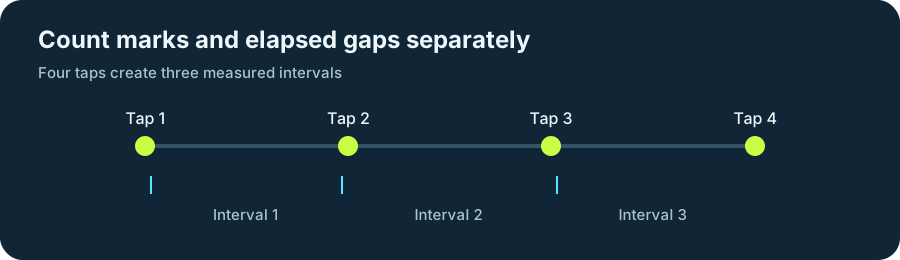
| Taps made | Intervals counted |
|---|---|
| 2 | 1 |
| 4 | 3 |
| 8 | 7 |
| 16 | 15 |
Intervals counted = taps made 鈭?1
BPM counter questions
These answers explain when a reading begins, how the two displayed values differ, and how to start counting a different song.
Why do I see two BPM values?
Current BPM uses only the newest interval. Average BPM uses every interval in the active reading, so it is less affected by one early or late tap.
Why is there no result after my first tap?
One tap contains no elapsed interval. The counter can calculate a tempo after the next beat arrives.
How do I count a different song?
Select Reset reading, or pause long enough for the current reading to end, and then begin tapping the new pulse.
What does a beats per minute counter measure?
It measures the spacing between your taps and converts that timing into beats per minute. Keep tapping the same pulse so the song bpm counter can average a consistent sequence.
The counter runs locally in your browser. No audio or tapping data is uploaded.