See where the pulse changed
The strip below plots every gap between taps against the session median. Bars near the center line match your prevailing pulse. A tall bar means that gap lasted longer; a short bar means it arrived sooner.
No intervals yet.
How the diagnostic is calculated
The tool converts each tap gap to BPM and uses the median interval as the center of the session. Timing spread is the median absolute distance from that center, reported in milliseconds. This describes the taps you entered; it is not a claim about the tempo of the recording.
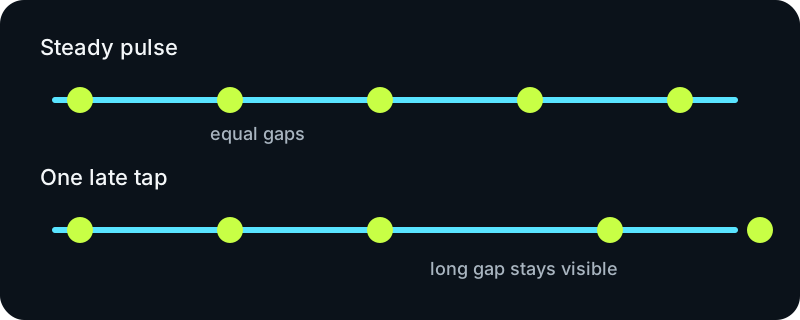
Separate drift from a single mistake
A gradual run of longer gaps suggests the tapped pulse slowed. One isolated long gap can instead come from a missed beat. If that gap is close to twice the median, the page labels it “possible missed tap”; a gap near half the median is labeled “possible extra tap.” The label is a timing clue, not an automatic correction.
Run a clean tap session
- Follow one repeating layer, such as the kick or snare, instead of switching between accents.
- Keep tapping long enough for several intervals to appear, then inspect the strip before accepting the number.
- Reset after a miss, a pause, or a deliberate change from half-time to double-time.
Tap consistency questions
Why use median BPM?
The median resists one unusually short or long gap better than a plain mean. The interval list remains visible, so you can still inspect what happened.
Does a small spread prove the song BPM?
No. It only shows that your taps were grouped closely. You can tap a steady subdivision or the wrong pulse and still be consistent.
What should I do with half-time and double-time?
Choose one level of the beat and keep it for the whole session. For a direct tempo reading without diagnostics, use the main BPM tapper; to hear a fixed reference, use the online metronome.
All tap timestamps stay in this browser tab. No microphone, upload, account, or server analysis is used.