Four exact previews · raw readings dated October 10, 2026
80 BPM Songs: Four Measured Half-Time Options
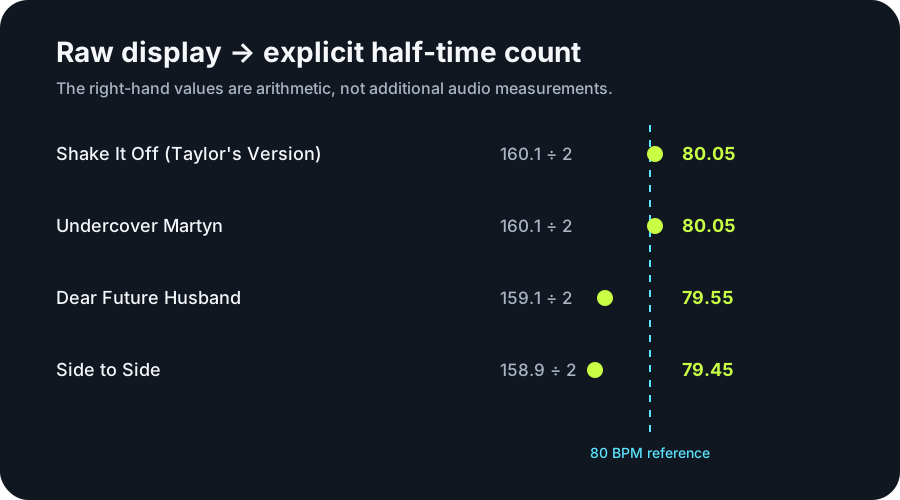
These four linked recording previews produced raw BPM Finder displays from 158.9 to 160.1 BPM; dividing those displays by two gives half-time counts from 79.45 to 80.05 BPM. The first screen keeps the raw measurement beside the arithmetic. It does not relabel the analyzer output, certify a whole-song tempo, or claim that half-time is the only valid pulse.
Exact catalog version, dated raw display, and transparent half-time arithmetic
Every half-time value is the raw display divided by two. The audio was measured once, on the date shown above; the derived number is not presented as a second detector run. Download the four-row evidence table.
The arithmetic stays attached to the measurement
“Shake It Off (Taylor’s Version)” and “Undercover Martyn” each displayed 160.1 BPM. The half-time count is therefore 160.1 ÷ 2 = 80.05 BPM. “Dear Future Husband” displayed 159.1, giving 79.55, and “Side to Side” displayed 158.9, giving 79.45.
The four derived counts span 0.60 BPM. At 80.05 BPM, one half-time beat lasts 60,000 ÷ 80.05 = 749.5 milliseconds. At 79.45 BPM, it lasts 755.2 milliseconds. The 5.7-millisecond difference comes from the preserved one-decimal source displays.
Original data graphic showing the raw detector layer and the separate half-time calculation.
Why this page does not call the raw results 80 BPM
The BPM Finder followed a faster recurring layer in all four excerpts. A listener can count every second detected beat and work near 80 BPM, but the analyzer itself displayed values near 160. Keeping both layers visible prevents a useful listening choice from being mistaken for another measurement.
The recording does not slow down when the count changes. Half-time is a choice about which recurring events receive the beat label. That choice can help with practice, editing, walking, or a metronome grid, but the page cannot decide the intended meter from arithmetic alone.
The evidence belongs to these versions and excerpts
The raw readings come from the exact catalog listings linked in the table and were recorded on October 10, 2026 with the site’s browser-local BPM Finder. Each available catalog preview was analyzed in full. The source did not state where that preview begins inside the complete recording.
A live version, remix, remaster, edit, or another excerpt can produce a different result. These rows therefore establish only what the linked previews displayed on the recorded date. No audio or lyrics are hosted by this page.
Use the count without inventing a running pace
If one footfall lands on each 80.05 BPM half-time beat, the cadence is 80.05 steps per minute. If both left and right footfalls are counted against the faster layer, the same excerpt offers 160.1 step events per minute. Those descriptions use different counting conventions for the same measured pulse relationship.
Distance pace also needs measured step length. With step length L meters, pace is 1,000 ÷ (80.05 × L) minutes per kilometer for the slower count. No runner, distance, or stride length was measured here, so the music value alone cannot produce a personal pace.
How to reproduce the comparison
Open the exact catalog version linked in the table.
Supply the legally available preview or a file you own to the browser-local BPM Finder.
Record the one-decimal display and the date without rounding it to the target phrase.
Divide the raw display by two and label the result as half-time arithmetic.
Are these four previews measured directly at 80 BPM?
No. Their direct displays range from 158.9 to 160.1 BPM. The values near 80 are explicit division by two.
Does half-time mean the song is slower?
No. The audio is unchanged. Half-time selects a slower pulse layer for counting.
Why reuse measurements from an earlier date?
The evidence already identifies the exact versions, method, raw displays, and date. This page adds a transparent half-time interpretation while keeping that original measurement date instead of pretending the files were newly measured.
Can a later check differ?
Yes. A catalog preview can change or disappear, and another section or version may emphasize a different layer. Record the source, version, date, and raw display whenever you repeat the test.