Press Start for a 60 BPM click. Quarter-note beats are exactly 1,000 milliseconds apart. The control starts at 60 and stays adjustable if your practice plan changes.
BPM
Compare your spacing
Tap against the one-second pulse
At 60 BPM, a centered pair of taps should be about 1,000 milliseconds apart. The interval row exposes each gap instead of hiding it behind one average.
Current tap BPM—
Average tap BPM—
Recent tap intervals
— ms
— ms
— ms
— ms
— ms
— ms
The 60 BPM timing grid
The base interval is 60,000 milliseconds divided by 60 beats, which equals 1,000 milliseconds. The other rows come from multiplying or dividing that base interval; they do not change the selected BPM.
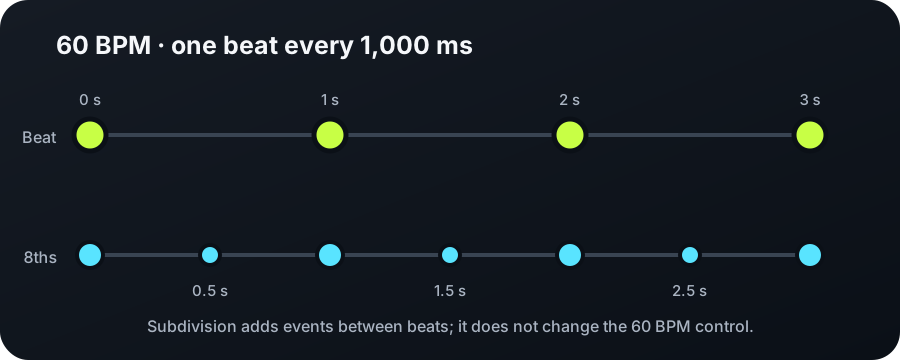
Four quarter-note beats occupy four seconds; eighth-note subdivision adds a click at each half-second.
Click value
Interval
Calculation from 60 BPM
Half note
2,000 ms
1,000 × 2
Dotted quarter
1,500 ms
1,000 × 1.5
Quarter note
1,000 ms
60,000 ÷ 60
Eighth note
500 ms
1,000 ÷ 2
Eighth-note triplet
333.3 ms
1,000 ÷ 3
Sixteenth note
250 ms
1,000 ÷ 4
A wall-clock check that does not depend on labels
Leave the metronome at 60 BPM with quarter-note subdivision. Starting with the first click, thirty beat intervals should occupy thirty seconds. In 4/4, eight complete bars contain thirty-two beats, so the interval from the first beat to the next hypothetical beat after bar eight spans thirty-two seconds.
Choose 4/4 and quarter notes, then start the click.
Count eight full bars while following the accented first beat.
Use an external clock only as a rough playback check. Device audio latency can shift when the first sound reaches you, while the internal click schedule still uses the browser audio clock.
Why 60 BPM can sound like 120 clicks per minute
The BPM field names the quarter-note pulse: sixty quarter-note beats per minute. Selecting eighth notes adds one midpoint click between each pair of quarter notes, producing 120 audible click events per minute while the underlying beat remains 60 BPM. The extra events are subdivisions, not a silent change to the tempo control.
This distinction is useful when one-second gaps feel too exposed. Keep the same 60 BPM beat and add eighth notes for guidance, then remove the subdivision without changing the tempo once the spacing feels stable.
Yes when the beat unit is the quarter note. Sixty quarter-note beats spread evenly across sixty seconds produce one beat each second.
Does eighth-note subdivision make the tempo 120 BPM?
No. It produces two clicks inside each one-second beat cycle while the selected quarter-note pulse remains 60 BPM.
Why must I press Start before hearing sound?
Browsers normally require a user interaction before beginning an audio context. Pressing Start creates or resumes that local audio clock.
Timing boundary
The intervals above are transparent calculations from a selected 60 BPM value. They do not measure a performance, certify playback latency, or show that a recording stays at 60 BPM. The tap panel reports your browser input timing; the BPM Finder estimates a pulse from a selected audio file.