Read the BPM and key as two separate signals
The tempo describes a repeating pulse. The key describes the strongest tonal center and major or minor quality. A confident-looking number in one column does not prove the other signal, so check rhythm and harmony separately.
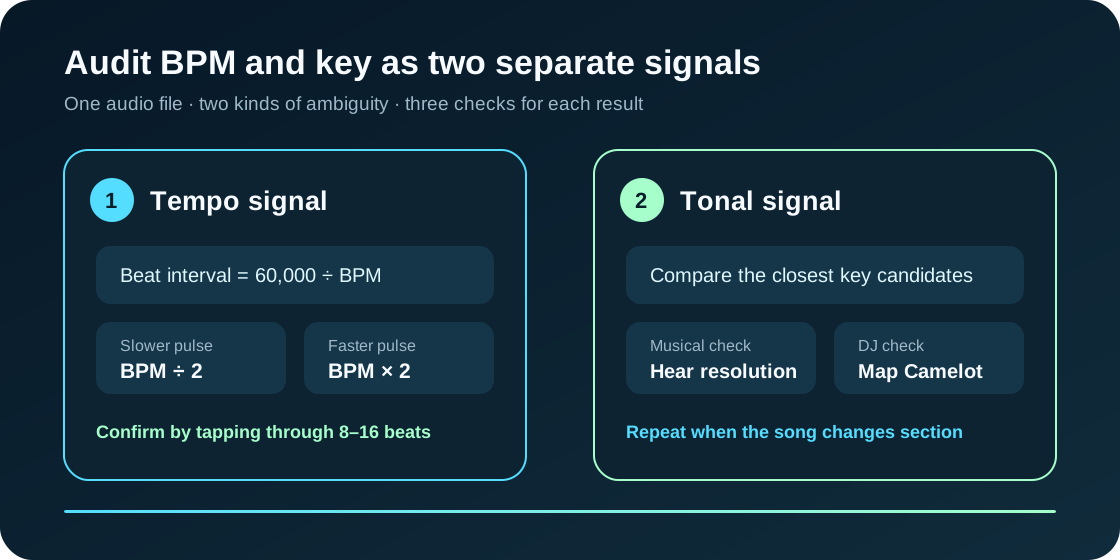
How the derived audit numbers are calculated
Beat interval in milliseconds = 60,000 ÷ BPM. Half-time is BPM ÷ 2; double-time is BPM × 2. These are transparent arithmetic checks, not extra measurements.
| Analyzer output | Independent check | Use it when |
|---|---|---|
| Estimated BPM | Tap through 8–16 beats or test half and double the reading. | The groove feels twice as fast or half as fast as the number. |
| Detected key | Listen for the chord or note that feels resolved at the end of a phrase. | The top candidates are close, or the song moves between sections. |
| Camelot code | Compare same-number A/B and adjacent numbers on the same ring. | You are planning a harmonically related DJ transition. |
Use one stable section of the exact recording
- Choose the exact release, edit, or live recording you intend to use.
- Prefer a section with clear drums and pitched instruments; avoid a silent intro or percussion-only break.
- Read the primary key beside the closest candidates, then check the BPM against its half-time and double-time alternatives.
- Repeat with another section when the arrangement changes tempo, key, or tonal center.
What runs locally in the browser
The selected file is decoded into an in-memory audio buffer. Recurring onsets provide the tempo estimate, while spectral energy is grouped into pitch classes and compared with major and minor profiles. The file is not sent to an upload endpoint.
| Stage | Output | Primary reference |
|---|---|---|
| Decode | Browser-readable samples held in memory. | W3C Web Audio API |
| Tempo | An estimate from recurring onset intervals. | Music Tempo |
| Key | A major or minor candidate from tonal features. | Essentia KeyExtractor |
| DJ notation | A Camelot code mapped from the detected key. | Mixed In Key Camelot Wheel |
BPM and key finder questions
Does the song leave my device?
No. Browser APIs decode and analyze the file locally. Clearing the file removes it from this page.
Why can the BPM be exactly half or double another result?
A groove can support several related pulse levels. The analyzer may follow slower accents or faster subdivisions; both can describe the same recording.
Why are several keys shown?
Relative major and minor keys share notes, and some songs use modes, modulation, or a weak tonal center. The candidate list exposes that ambiguity instead of hiding it.
Can I use the result to transpose a vocal?
Use the detected key as a starting hypothesis, then confirm it by ear or with an instrument before committing to a transposition.
Audio decoding, tempo estimation, and key analysis stay on this device.